Note: It is recommended that you first create and sign in to your personal software account and then bind the license key to your account to activate the software on your device, so that you can reset and reactivate it directly from your software account when you change to a new device in the future.
Excellent image quality with optimized file size
Photos preserve irreplaceable memories and capture the special moments of our lives. However, they don’t always turn out exactly as expected and may still have room for improvement. Ashampoo Photo Optimizer Pro 26 helps you enhance your photos with a single click, delivering impressive results almost instantly and automatically—even when processing multiple images at once with convenient batch editing.
Efficient image compression with full control
With the new image compression feature, you can perfectly balance quality and file size. JPG, WebP, and PNG files can now be reduced quickly and precisely—including an interactive live before/after preview. As you adjust the settings, you’ll see the expected file size in real time and maintain full control over the final result. Save valuable storage space without visible quality loss—ideal for online use, archiving, or sharing Your images quickly.
- Perfect image quality at optimal file size
- New image compression with live preview and file size control
- 27 new LUTs for fresh one-click looks
- New photo frames for additional image moods
- Modernized user interface
- Enhanced RAW support and optimized metadata handling
27 Brand-New LUTs Included!
LUTs (Look-Up Tables) adjust multiple image parameters such as hue, saturation, brightness, and contrast at once, giving photos a completely new look and atmosphere. In this new version, the LUT collection has been significantly expanded: Three new LUTs have been added to each of nine categories—Halloween, Christmas, Autumn, Summer, Vintage, Contrast, HighKey, LowKey, and FX. This means 27 new looks are now available for seasonal images, creative effects, or striking contrast styles.
New frames, new formats, new look
With targeted enhancements, Photo Optimizer has been further refined both visually and technically. New frames expand the existing design library and offer additional options for different image moods. At the same time, the redesigned interface provides a more modern, streamlined appearance without changing the familiar, easy-to-use workflow. In addition, RAW format support has been significantly enhanced and metadata handling optimized for clean and reliable processing.
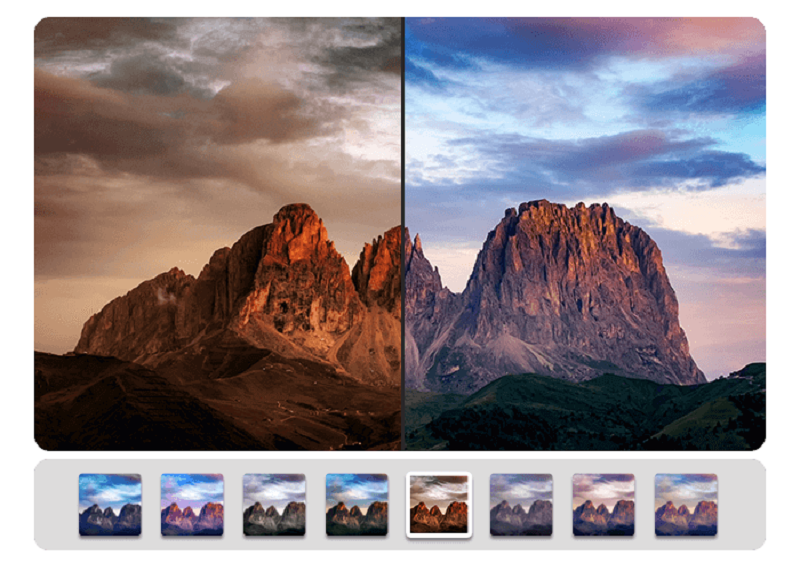
Perfect results almost instantly
You can spend hours meticulously optimizing every aspect of your photos in search of the perfect look–or you can achieve the same in seconds using our lookup tables crafted by image editing experts. Dissatisfied with the lighting of a whole series of shots? Looking for that uniform exposure across your photo collection? LUTs will fix these issues and add the visual harmony and polish your shots deserve! From now on, visual excellence may always be just one click away!
Level up your vacation, wedding, and party shots!
Straighten misaligned shots, fix perspective errors, or apply a whole range of beautiful effects. Minor issues like red eyes, skin imperfections or stains are now easily fixable. Save time and nerves and achieve stunning results almost instantly with Photo Optimizer!
Important basics and creative freedom
Naturally, Ashampoo Photo Optimizer includes all the usual suspects like image cropping, rotating, watermarking, and softening. But it doesn't stop there. Feel free to get creative with artistic effects and elegant frame designs. Whether you're recovering failed shots, cranking up the image quality by another 5% or just having fun, this is the program for you!
The lifesaver for your vacation shots
Visual blemishes are detected and fixed through careful image analysis. Our carefully crafted algorithm fully automatically optimizes colors, contrasts, and exposure times for single shots or entire collections, turning underwhelming shots into brilliant photos!
A matter of perspective!
Photos of buildings often suffer from noticeable perspective distortions caused by the shooting angle. Tall structures may appear tilted, or your camera may not have been perfectly straight without a tripod. With Photo Optimizer’s perspective correction, you can easily fix horizontal or vertical distortions in just a few clicks and restore the proper look to your photos.
More ease of use with Favorites
Everyone has tools they use most often. With the customizable Favorites menu in Ashampoo Photo Optimizer, you can gather your preferred functions in one convenient place—making tasks like straightening the horizon, correcting perspective, or cropping quicker and easier.
Better white balance and contrast
White balance plays a key role in accurate color temperature, but digital photos often appear too bluish or dull. Low contrast caused by poor lighting is another common issue. Photo Optimizer’s white balance and contrast spread adjustments help restore natural colors and improve image depth automatically when needed.
Flexible export options
Great photos deserve to be shared. Photo Optimizer offers several ways to export your images, including email, Ashampoo Web, or setting them as your desktop wallpaper. If you prefer printing, the advanced print dialog ensures high-quality and space-efficient results.
Natural-looking portrait enhancements
Portraits rarely come out perfect. Photo Optimizer lets you enhance them automatically or manually—remove red eyes, whiten teeth, and use the clone tool to fix small imperfections. Achieve clean, natural-looking portraits in just a few clicks.
Comfortable batch processing
Since Ashampoo Photo Optimizer does so much fully automatically, we've included batch processing to save you time and nerves while the program processes your entire photo library in one go. Select individual images from various sources or entire folders and have Photo Optimizer work its magic. Every image is meticulously analyzed and its quality optimized according to its specific characteristics. Batch-process an entire vacation in one go, polish your wedding or birthday shots and put the fun back into photography.
System Requirements:
- You need the 64-bit version for the following operating systems: Win 11, Win10 64Bit
- Requirements: Any device that supports the operating systems listed above.
- Other: Visual C++ 2015 x64 Redistributable